
Analytics methodology
How Method calculates every number on the Progress pages, including estimated 1RM, trends, records, activity, muscle coverage, cardio, and program counts.
Analytics states what your logged training contains. It stops short of diagnosing, prescribing, or judging whether training is balanced or sufficient. Every number below is reproducible from your log. When the data cannot support a statement, Method says so.
Estimated 1RM
Strength trends use an estimated one-rep max from each completed set: weight multiplied by one plus effective reps divided by 30, where effective reps are logged reps plus reps in reserve. A set without logged reps in reserve counts as zero. Each training day keeps its best estimate, warmup sets are excluded, and summary charts plot one point per training day.
Set comparisons
The iOS exercise history chart draws one line for each set number. Working sets, failure sets and sets without a type share one count: Set 1, Set 2. Back-off sets and custom sets have their own counts. Warmup sets and drop sets are not counted.
Each set compares with the set of the same count in an earlier session. A program session uses the latest earlier session of the same program day. A saved session uses its latest earlier run. Other sessions, including sessions from a coach's date-based training plan, use the previous session of the exercise. An exercise done twice in one workout compares each time with the same place in the earlier workout.
The comparison shows the change in load, reps and reps in reserve. When the plan for a set changed, it also shows the new target.
Trend lines
The change on Lifts and on a lift page covers the range you choose. Lifts offers 4W, 3M, 6M, and 1Y. A lift page offers 1M, 3M, 6M, 1Y, and Custom. Both open on 3M. Method compares the best estimated 1RM in the last third of the range with the best in the first third. The number is the literal difference, for example +5 kg in 3 months. Method colours a change only when it is at least 2.5 percent and at least 1 kg or 1 lb. A trend needs at least two training days at least 14 days apart. With less data, Method shows the session count instead.
Records
A strength PR is a completed set whose estimated 1RM, rep count at a weight, or load exceeds every earlier set you have logged for that exercise. Cardio best efforts compare pace over matched distances. Records use the same scoring as the weekly review. Recent PRs on Overview lists records from the last 14 days. Recent PRs on Lifts shows the newest strength PRs from the last 90 days.
Activity and streaks
- Training days count completed sessions on each calendar day in your timezone
- Weeks run Monday to Sunday
- Streaks count days in a row with at least one completed session
- A day without a session ends a streak, but today keeps the streak intact until it ends
Muscle coverage
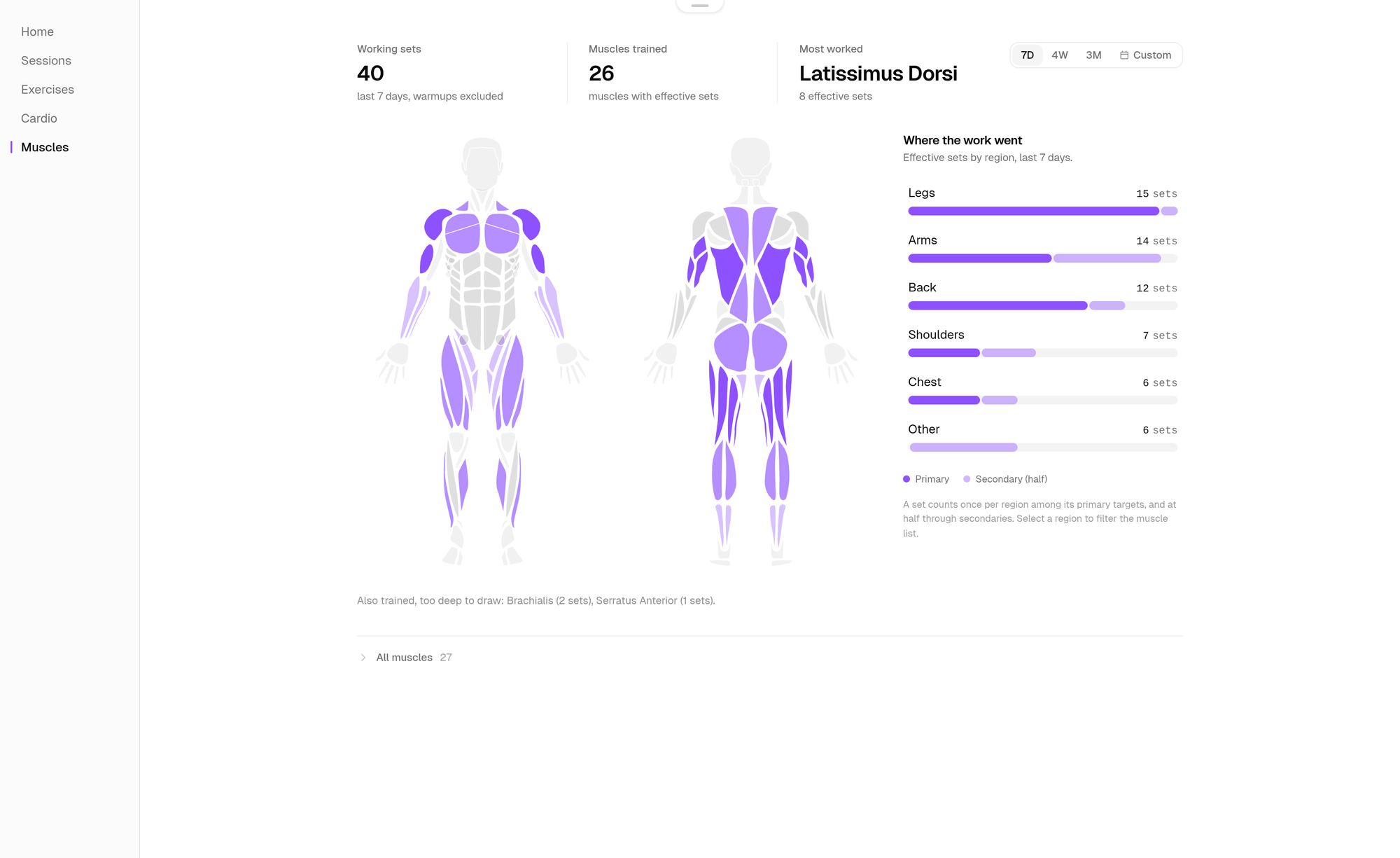
Muscle counts use the effective sets model, the comparative unit for training frequency and volume. Muscles counts over the range you choose: 7D by default, 4W, 3M, or Custom. Where the work went on Overview covers the last 7 days. Only completed working sets count. Warmup and drop sets are excluded. Each eligible set credits every primary target muscle on the exercise with one full set, and every secondary muscle with half a set. A muscle listed as both counts once, as primary. Every effective number stays decomposable, and the pages show the primary and secondary counts that produced it. The per-week chart for a selected muscle covers at least the last 4 weeks, and the full range when the range is longer.
Regions follow the same rule. A set counts once per region among its primary targets, and half per region reached only through secondary muscles. The body map shades each muscle relative to your own most worked muscle in the window. It states where your sets went. Deep muscles that cannot be drawn on a surface figure, such as the rotator cuff, are listed in text. Sets from exercises without target muscles are shown separately as not counted.
Cardio
Cardio metrics aggregate per activity type. Volume metrics such as distance and duration are summed per week. Rate metrics such as pace are weighted by duration or distance.
Planned versus completed
Program counts read your active schedule directly. Planned to date is every scheduled session up to today. Completed and skipped are the statuses you set. Upcoming is what remains. Method leaves out an adherence percentage.
History windows
Free accounts see the last 30 days of history. Method Pro keeps everything. Each Progress page states its range. Overview covers the last 26 weeks for its session calendar and counts. Lifts and lift pages use the range you choose, 3M by default. Recent PRs on Lifts cover 90 days.
Last updated October 30, 2026. Markdown version