
Log your first workout
Start a scheduled session on iOS, record what you did, and save a completed record.
Once a program is active, the session you are meant to train shows up on your calendar. Logging it is the last step of getting set up.
Open Calendar and start the session
Today's training day is at the top. Tap it, then start the session. If you are mid-session already, the resume bar at the bottom takes you back in.
Work through the exercises in order
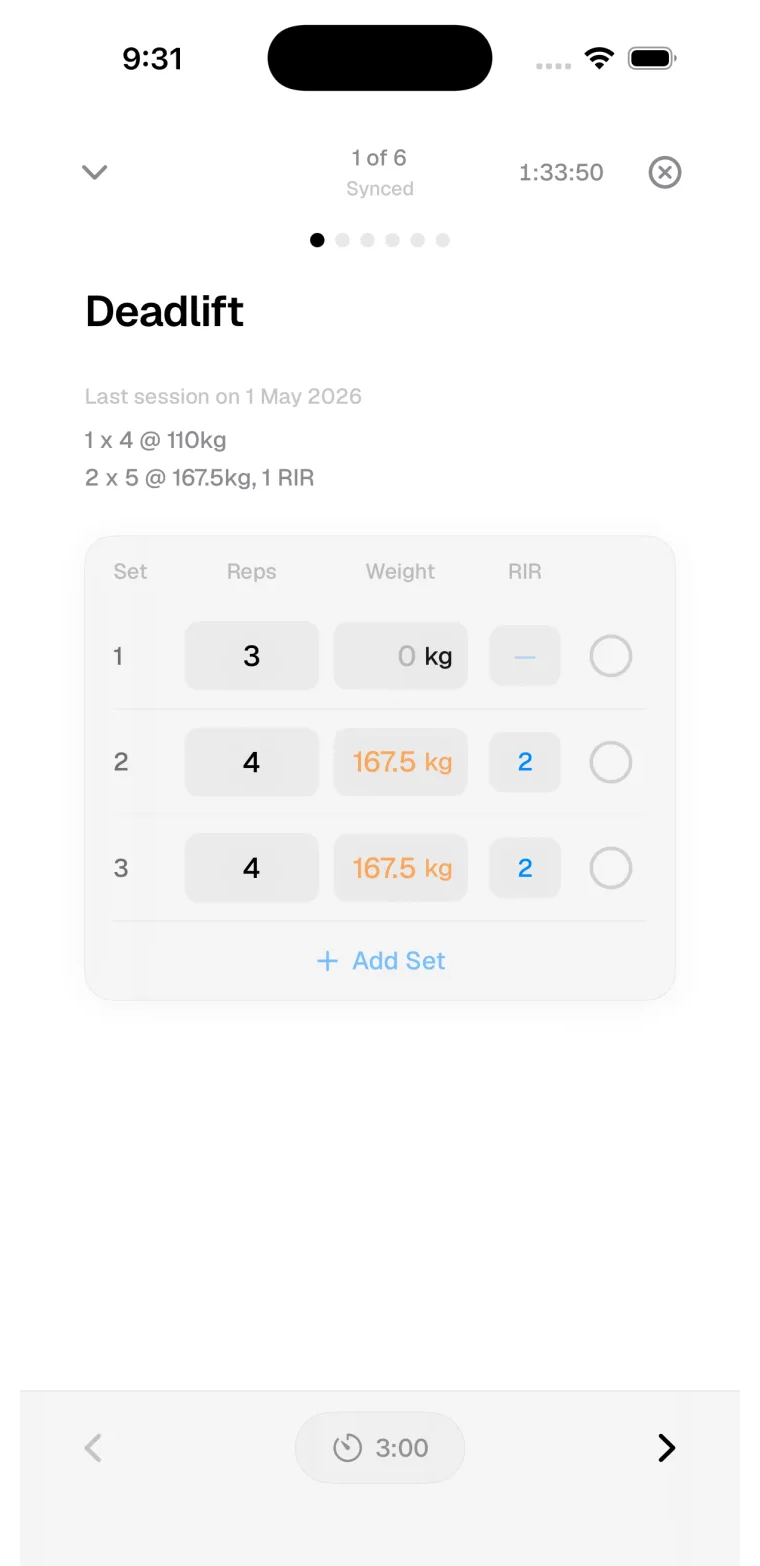
Each exercise shows its planned sets. The logger displays what was prescribed alongside fields for what you did.
Record each set as you complete it
Enter reps and load, then mark the set complete. If the set went differently than planned, log the real result.
Review and save
After the last set, Method shows a review step for session notes and effort. Effort starts unset on purpose, so whatever you save is a deliberate answer.
Things that trip people up first time
My planned load is empty
Method pre-fills a load only when it has history to base it on, and only when smart loads are enabled with Advanced tracking. First time through, you enter it yourself. That becomes the history for next time.
I did a different exercise than planned
Add the exercise you performed to the session and log it there. Your history should describe the training that happened.
I had to stop partway through
Save anyway. Method warns you that work is incomplete and lets you decide whether the record is ready. A short honest session is good history.
Last updated July 26, 2026. Markdown version